Platform
Build an MCP server with Authalla
You build and host the MCP server. Authalla signs your users in, asks them to approve the agent, and issues access tokens for your server. Your server verifies those tokens and doesn't need its own OAuth implementation.
This works for any API that accepts bearer tokens. MCP is the case where you can't register the clients in advance.
How a connection works
Take Acme, whose tenant is acme.authalla.com and whose MCP server is https://mcp.acme.com/mcp:
- A user adds
https://mcp.acme.com/mcpto Claude, ChatGPT or another MCP client. - The server answers the first request, which has no token, with
401and aWWW-Authenticate: Bearer resource_metadata="https://mcp.acme.com/.well-known/oauth-protected-resource/mcp"header. - That protected resource metadata document names
https://acme.authalla.comas the authorization server. - The client identifies itself with a Client ID Metadata Document (see below). The user signs in to Acme's tenant and approves the connection on the consent screen.
- The client receives an access token whose
audishttps://mcp.acme.com/mcpand whosescopelists the permissions the user granted. It sends the token on every request. - The server checks the token: either locally, against the tenant's JWKS, or by asking Authalla on each call (see Validate tokens).
Authalla is only the authorization server. No Authalla gateway or proxy sits in front of your server.
This needs users who sign in through Authalla. They can use any of the tenant's sign-in methods, including SSO connections. Using another identity provider as the only sign-in isn't supported.
Register your server
- Open Tenants → (select tenant) → Resource servers.
- Turn on Let AI agents such as Claude and ChatGPT register themselves. MCP clients can't connect to the tenant while it's off.
- Choose Add resource server and enter:
- Identifier: your server's URL, such as
https://mcp.acme.com/mcp. It must be an absolutehttpsURL without a fragment (httpis allowed only on loopback addresses). It is theresourceclients ask for and theaudof their tokens. Each identifier can be used only once in a tenant. - Name: shown to users on the consent screen, as in "Claude wants to access Acme CRM".
- Scope prefix: a short code such as
crm. It can't be changed after you create the server. Each prefix can be used only once in a tenant. Prefixes that Authalla uses for its own scopes (users,apps,tenantsand others) are reserved.
- Identifier: your server's URL, such as
- Add scopes. Each scope has a name (
read) and a description the consent screen shows ("Read your contacts and deals"). Its full name is<prefix>:<name>, socrm:read, in requests, in tokens and on users.
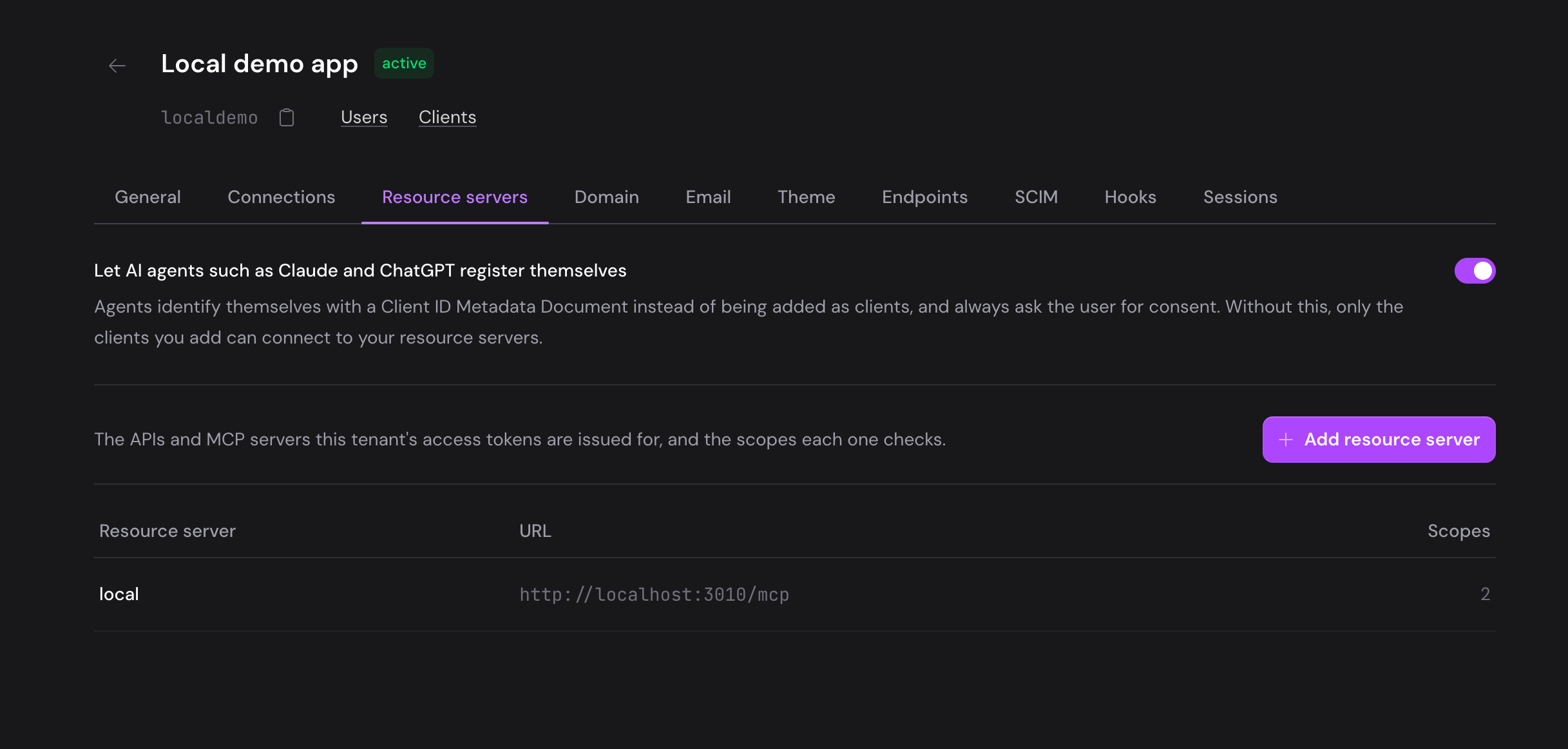
A token request with a resource that isn't registered in the tenant fails with invalid_target. A request without resource works as before and never gets a resource server's scopes.
You can also register resource servers as code. The Management API has them under /management/v1/tenants/{tenant_id}/resource-servers, with the resource-servers:read and resource-servers:write account API key scopes, and the MCP server has the same operations as tools, such as create_resource_server. Both return the protected resource metadata described below. The MCP tools also return the token checks with your server's values and a link to this guide, and say when the tenant doesn't let AI agents in yet. get_tenant returns the tenant's issuer.
Decide who gets which scope
A token for your server carries a scope only if the user holds it. Scopes a user doesn't hold are dropped without an error, and the consent screen doesn't list them. Users only approve what the token will contain.
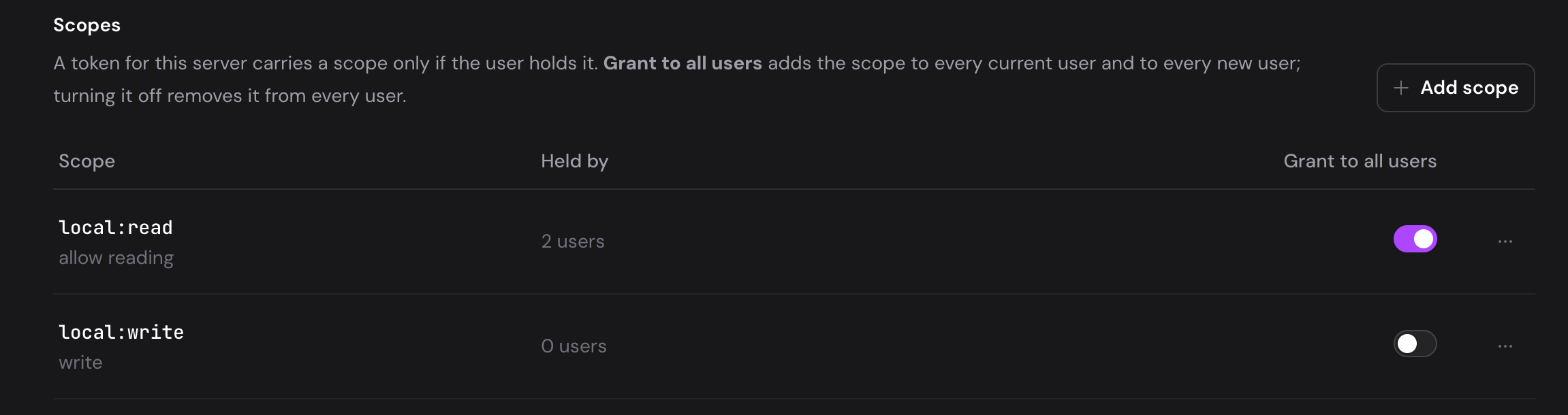
- One user at a time: open the user, then the Permissions tab. Resource server scopes appear there, grouped under their server. The Application API's
scopesfield on a user sets them too, and so does the MCP server'supdate_usertool. - Everyone: turn on Grant to all users on a scope (
grant_to_all_usersin the Management API and the MCP tools). The scope goes to every current user of the tenant and to every user created later, whether they sign up, arrive through SSO or SCIM, or are created through an API. Turning it off removes the scope from every user. The dashboard first shows how many users that affects.
While Grant to all users is on, you can still take the scope from one user. That user stays without it until the switch is turned off and on again.
Removing a scope from a user, turning off Grant to all users or deleting a scope takes effect at the agent's next token refresh: the refreshed token no longer carries the scope. Deleting the resource server makes every refresh for it fail.
Serve the protected resource metadata
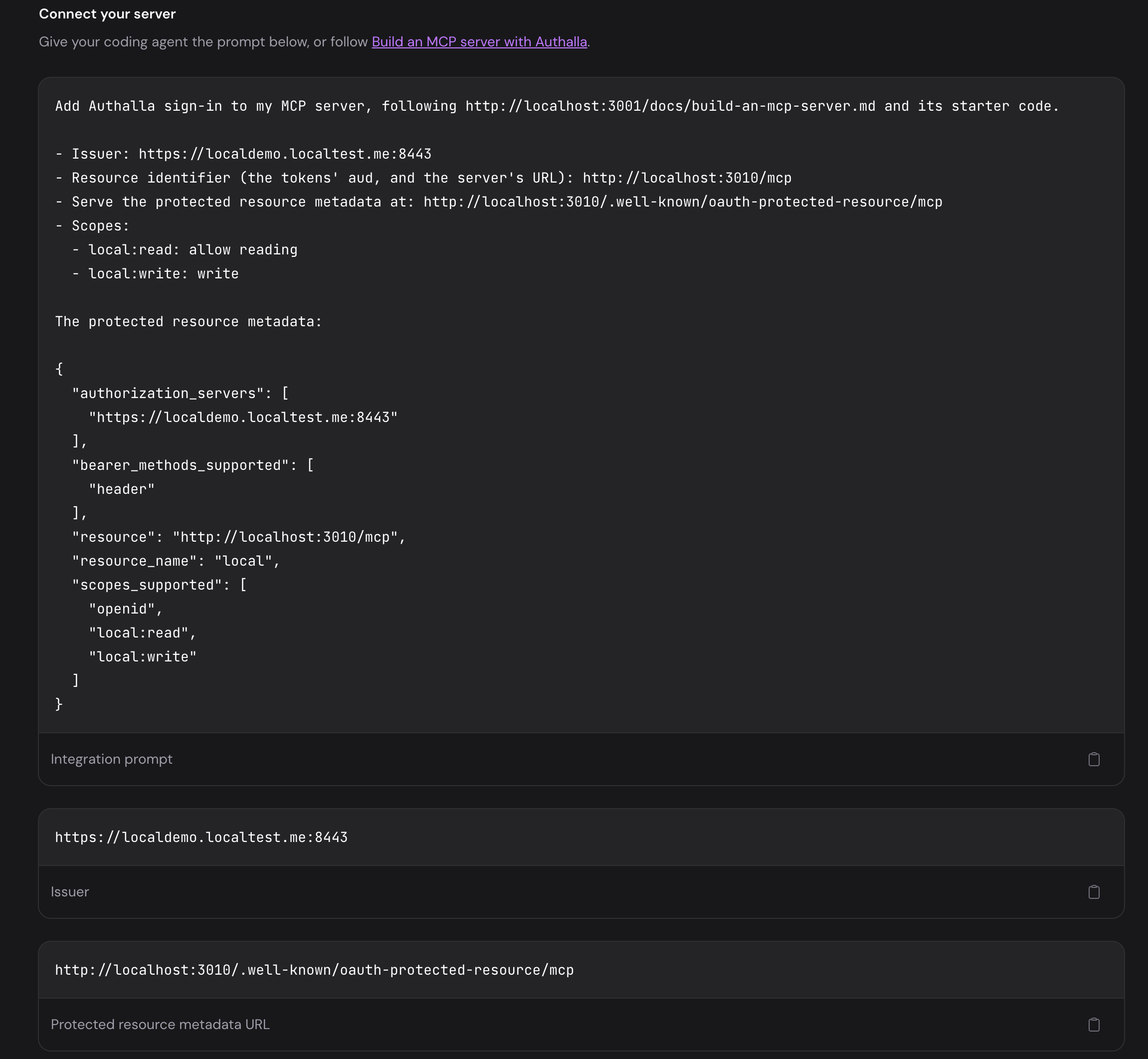
Your server tells MCP clients where to sign in with an RFC 9728 protected resource metadata document. The resource server's page in the dashboard, under Connect your server, shows the exact document and the URL to serve it at. For the example above, serve it at https://mcp.acme.com/.well-known/oauth-protected-resource/mcp:
{
  "resource": "https://mcp.acme.com/mcp",
  "resource_name": "Acme CRM",
  "authorization_servers": [
    "https://acme.authalla.com"
  ],
  "scopes_supported": [
    "openid",
    "email",
    "crm:read",
    "crm:write"
  ],
  "bearer_methods_supported": [
    "header"
  ]
}
authorization_serversis the tenant's issuer: an active custom domain, the primary one first, otherwise itsauthalla.comsubdomain. Tokens carry asissthe address the user signed in on, so if you add or change a custom domain later, update the metadata and your server's issuer check together.scopes_supportedincludesopenidbecause every authorization request needs it, andemailso the token says who the user is (Know who is calling). Clients take the scopes to request from this list. The tenant's own discovery document doesn't list resource server scopes.
Answer every request without a valid token with 401 and a WWW-Authenticate header whose resource_metadata points at this URL. The official MCP SDKs do this for you, as in the code below.
Validate tokens
Your server can check a token in two ways (Revoke access compares them):
- Locally, as a signed JWT. No call to Authalla per request, but a token stays valid until it expires, even after you revoke the agent. The code below does this.
- With introspection, asking Authalla on every call. Revoking the agent stops it on its next call. See Check each call with Authalla.
Access tokens are RS256-signed JWTs that follow RFC 9068. To check one locally, check all of these:
| Check | Expect |
|---|---|
| Signature | A key from https://acme.authalla.com/.well-known/jwks.json |
typ header | at+jwt, so an ID token can't be used instead |
iss | The tenant's issuer, as in authorization_servers |
aud | Your identifier, exactly |
exp | In the future |
scope | Space-separated. Contains what the tool needs |
The token also carries sub (the user's ID), client_id (the agent), tid (the tenant) and, with the email scope, email. See Sessions & tokens for all the claims.
The code below is for the Acme example: replace ISSUER, RESOURCE, the metadata and the scopes with your own. The resource server's page in the dashboard, under Connect your server, has an integration prompt that points a coding agent at this guide with your values filled in. The code was checked against @modelcontextprotocol/sdk 1.30 with jose 6, and mcp 2.2 with PyJWT 2.14.
TypeScript
import express from 'express';
import { createRemoteJWKSet, jwtVerify } from 'jose';
import { McpServer } from '@modelcontextprotocol/sdk/server/mcp.js';
import { StreamableHTTPServerTransport } from '@modelcontextprotocol/sdk/server/streamableHttp.js';
import { requireBearerAuth } from '@modelcontextprotocol/sdk/server/auth/middleware/bearerAuth.js';
import { getOAuthProtectedResourceMetadataUrl } from '@modelcontextprotocol/sdk/server/auth/router.js';
import { InvalidTokenError } from '@modelcontextprotocol/sdk/server/auth/errors.js';
import type { OAuthTokenVerifier } from '@modelcontextprotocol/sdk/server/auth/provider.js';

const ISSUER = "https://acme.authalla.com";
const RESOURCE = new URL("https://mcp.acme.com/mcp");
const jwks = createRemoteJWKSet(new URL(`${ISSUER}/.well-known/jwks.json`));

const verifier: OAuthTokenVerifier = {
  async verifyAccessToken(token) {
    try {
      const { payload } = await jwtVerify(token, jwks, {
        issuer: ISSUER, audience: RESOURCE.href, typ: 'at+jwt', algorithms: ['RS256'],
      });
      return {
        token,
        clientId: String(payload.client_id),
        scopes: String(payload.scope ?? '').split(' ').filter(Boolean),
        expiresAt: payload.exp,
        extra: { sub: payload.sub, email: payload.email },
      };
    } catch {
      throw new InvalidTokenError('Invalid access token'); // any other error becomes a 500
    }
  },
};

const app = express();
app.use(express.json());

app.get("/.well-known/oauth-protected-resource/mcp", (_req, res) => {
  res.json({"resource":"https://mcp.acme.com/mcp","resource_name":"Acme CRM","authorization_servers":["https://acme.authalla.com"],"scopes_supported":["openid","email","crm:read","crm:write"],"bearer_methods_supported":["header"]});
});

const auth = requireBearerAuth({
  verifier,
  requiredScopes: ["crm:read"], // every request needs these; check others per tool in req.auth.scopes
  resourceMetadataUrl: getOAuthProtectedResourceMetadataUrl(RESOURCE),
});

app.post(RESOURCE.pathname, auth, async (req, res) => {
  const server = new McpServer({ name: "Acme CRM", version: '1.0.0' }); // register tools here
  const transport = new StreamableHTTPServerTransport({ sessionIdGenerator: undefined });
  res.on('close', () => { transport.close(); server.close(); });
  await server.connect(transport);
  await transport.handleRequest(req, res, req.body);
});

app.listen(3000);
Python
import jwt
from jwt import PyJWKClient
from mcp.server.auth.provider import AccessToken, TokenVerifier
from mcp.server.auth.routes import create_protected_resource_routes
from mcp.server.auth.settings import AuthSettings
from mcp.server.mcpserver import MCPServer

ISSUER = "https://acme.authalla.com"
RESOURCE = "https://mcp.acme.com/mcp"
jwks = PyJWKClient(f"{ISSUER}/.well-known/jwks.json")


class AuthallaTokenVerifier(TokenVerifier):
    async def verify_token(self, token: str) -> AccessToken | None:
        try:
            if jwt.get_unverified_header(token).get("typ", "").lower() not in ("at+jwt", "application/at+jwt"):
                return None
            key = jwks.get_signing_key_from_jwt(token).key
            claims = jwt.decode(token, key, algorithms=["RS256"], audience=RESOURCE, issuer=ISSUER,
                                options={"require": ["exp", "sub", "client_id"]})
        except jwt.PyJWTError:
            return None  # the SDK answers 401 with WWW-Authenticate
        return AccessToken(token=token, client_id=claims["client_id"], scopes=claims.get("scope", "").split(),
                           expires_at=claims["exp"], resource=RESOURCE, subject=claims["sub"], claims=claims)


mcp = MCPServer(
    "Acme CRM",
    token_verifier=AuthallaTokenVerifier(),
    auth=AuthSettings(issuer_url=ISSUER, resource_server_url=RESOURCE,
                      required_scopes=["crm:read"],  # every request needs these
                      validate_token_resource=False),  # verify_token already checks aud
)

# Register tools here with @mcp.tool()

app = mcp.streamable_http_app(host="0.0.0.0")  # run: uvicorn server:app
# The built-in metadata lists only required_scopes; serve the full document instead.
app.router.routes[:0] = create_protected_resource_routes(
    resource_url=RESOURCE, authorization_servers=[ISSUER], resource_name="Acme CRM",
    scopes_supported=["openid", "email", "crm:read", "crm:write"])
requiredScopes (required_scopes in Python) applies to every request. A token without one of those scopes gets 403 with insufficient_scope. Check any other scope in the tool that needs it: a tool that changes data checks for crm:write, for example.
Know who is calling
sub is the user's ID, the same as id in the Application API. When the agent was granted email, which it asks for because the metadata lists it, the token also carries the user's email and email_verified. Use them to show who did what, or to find the user in your own records, without calling Authalla. The TypeScript verifier above puts them in req.auth.extra; in Python they are in the access token's claims.
A token issued before the email scope was in your metadata, or by a client that didn't ask for it, has no email. Treat it as missing rather than calling Authalla with the agent's token: that token is for your server only, and Authalla refuses it everywhere else.
Check each call with Authalla
To make revoking take effect at once, replace the JWT check in the verifier with a call to the tenant's introspection endpoint. It needs a confidential app that holds the tokens:introspect scope: create one in Apps, add the scope on its Scopes tab, and give your server its ID and secret.
const CLIENT_ID = process.env.INTROSPECTION_CLIENT_ID!;
const CLIENT_SECRET = process.env.INTROSPECTION_CLIENT_SECRET!;

const verifier: OAuthTokenVerifier = {
  async verifyAccessToken(token) {
    const res = await fetch(`${ISSUER}/oauth2/introspect`, {
      method: 'POST',
      headers: {
        Authorization: `Basic ${btoa(`${CLIENT_ID}:${CLIENT_SECRET}`)}`,
      },
      body: new URLSearchParams({ token }),
    });
    // The introspection call failed, not the token: answer 500, not 401.
    if (!res.ok) throw new Error(`introspection failed with ${res.status}`);
    const t = await res.json();
    if (!t.active || ![t.aud].flat().includes(RESOURCE.href)) {
      throw new InvalidTokenError('Invalid access token');
    }
    return {
      token,
      clientId: t.client_id,
      scopes: String(t.scope ?? '').split(' ').filter(Boolean),
      expiresAt: t.exp,
      extra: { sub: t.sub, email: t.email },
    };
  },
};
active is false for a revoked or expired token, for a user who has been suspended or deactivated, and for anything that isn't an access or refresh token of the tenant. Check aud as above, since active doesn't say which server the token was issued for; requiredScopes still checks the scopes. Don't cache the answer, or a revoke waits for the cache.
Clients register themselves
MCP clients connect with an OAuth Client ID Metadata Document. The client's client_id is an https URL that points at a JSON document with its name and redirect URIs. Authalla fetches and validates the document when the client connects, so you don't register Claude, ChatGPT or any other agent in advance. See AI agents and Client ID Metadata Documents for the validation rules.
When an agent sends a user to sign in, the sign-in page names your tenant's product name, as in "Sign in to Acme CRM". The agent is named on the consent screen that follows.
These clients always show the consent screen, including when the user has approved them before. The screen names the client and your resource server, notes in one line that the client registered itself, so its name hasn't been verified (and that it runs on this computer when it redirects to a loopback address), and lists one line per scope the token will carry.
No Dynamic Client Registration
Authalla doesn't support Dynamic Client Registration (DCR, RFC 7591). DCR is a legacy protocol that wasn't designed for AI agents. Every connection creates a new anonymous client, and nothing ties that client to a real application. The MCP specification recommends Client ID Metadata Documents instead. Claude, Claude Code and ChatGPT support them. A client that supports only DCR can't connect.
An app you register yourself in Apps can also request tokens for a resource server by sending resource. For those apps the scopes allowed on the app still apply, in addition to the scopes the user holds.
Revoke an agent's access
Open the user, then the Connected apps tab. It lists every app that can still act for the user: apps whose consent is remembered, and apps with a live refresh token. For each app it shows the resource server, the scopes and when the app last got a token.
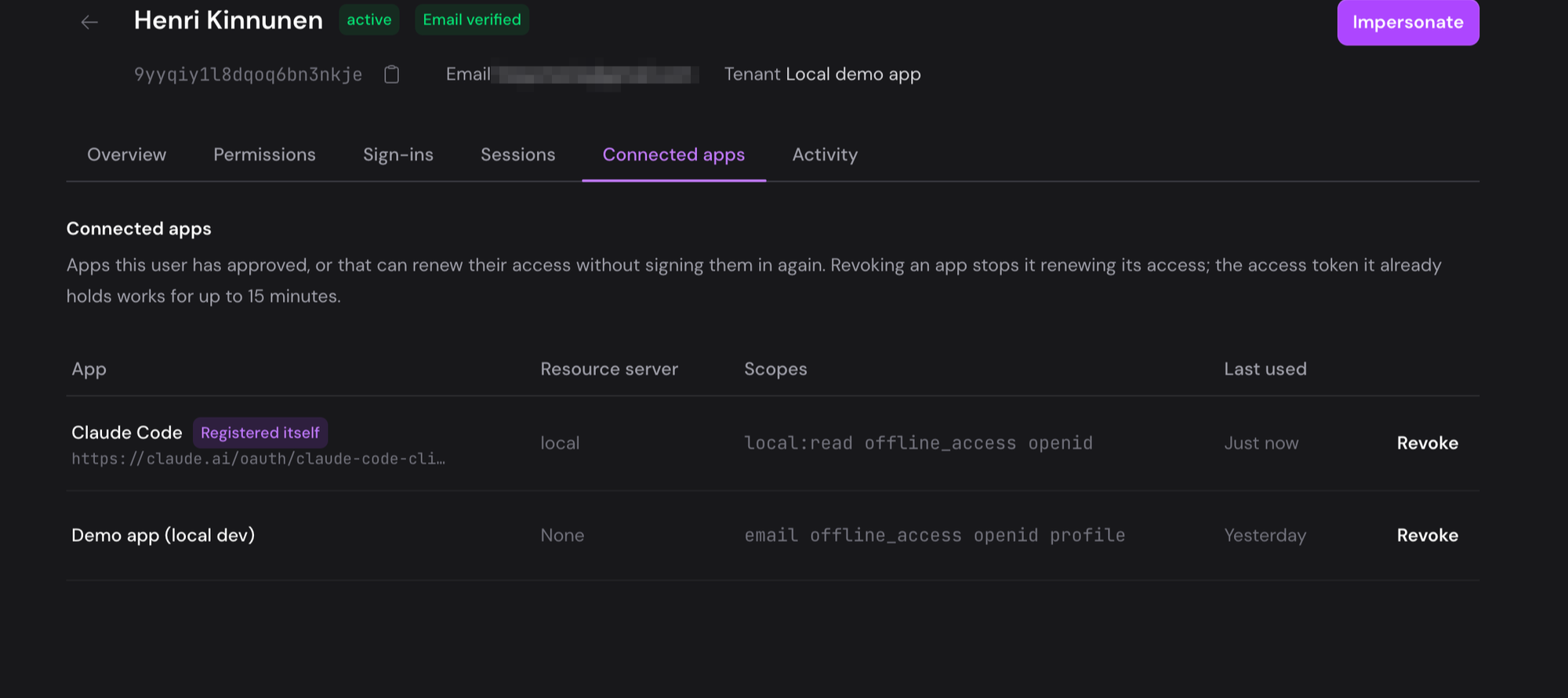
Revoke revokes the app's refresh and access tokens and deletes its remembered consent for that user. The app can't renew its access, and the user has to approve it again on the consent screen to keep using it.
If your server introspects, the app's next call fails. If it checks tokens locally, the access token the app already holds works until it expires, within the tenant's access token lifetime (15 minutes by default); the confirmation dialog says so.
Revoking an app doesn't sign the user out of the tenant, so if they are still signed in, reconnecting skips the sign-in and goes straight to consent. To cut the user off entirely, use Sign out everywhere on the user's Overview tab. Suspending or deactivating a user does the same. See Revoke access.
The MCP server has the same list and revoke as the list_connected_apps and revoke_connected_app tools. The Management API has no users, so it has neither.